

Campaigns that help customers return to your workshop
Prepare a seasonal offer, select recipients and schedule an SMS or Email campaign. Connect your message to a service, discount and personal booking link in PurelBase.
Campaigns connect your customer database, service catalogue, promotions and online bookings. Prepare service reminders, seasonal tyre offers or messages for selected customer groups from your workshop dashboard.
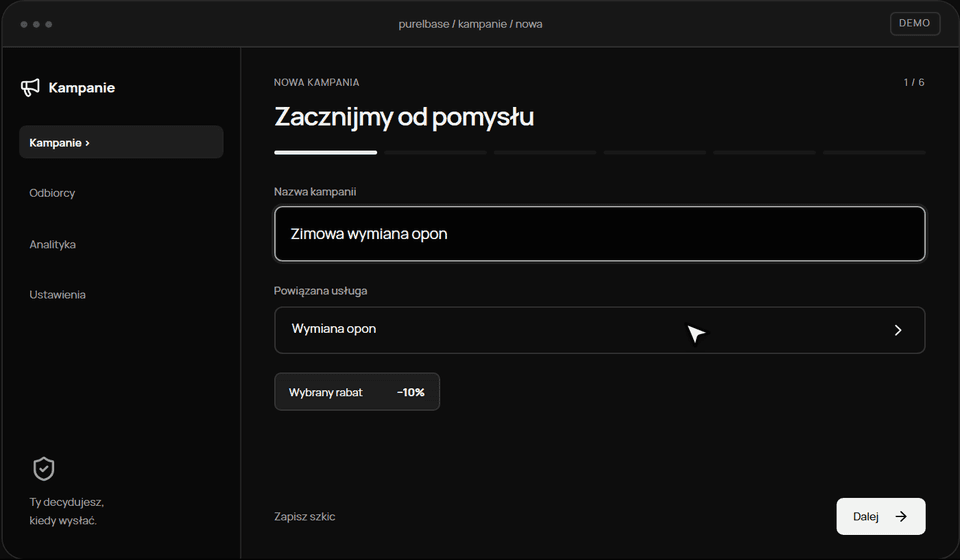
The wizard has six steps: idea, channel, message, recipients, schedule and review. Enter an internal name, choose a service and an existing promotion, or create a discount. Each campaign uses one channel: SMS or Email.
For example, before winter, select a tyre change, add a discount and prepare a message for customers who consented to that channel. A personal link lets the customer review the offer and choose an available appointment in your workshop calendar.
Save a draft or review the offer, message, audience, schedule and estimated cost before approval. Sending requires owner approval, a configured channel and the required billing conditions. Creating a campaign alone does not start sending.
SMS and the Email editor
SMS combines a short message with an automatically added booking link. Email supports a subject, text, image and styling. Check the preview: message length, Polish characters and links affect the number of chargeable SMS segments.
AI assistance you control
Generate suggestions using workshop, service and discount details, or improve and shorten your own text. A full Email template includes a subject, styling and image. You choose the suggestion and review prices, dates and wording before using it.
Customer segments and consent
Choose a saved segment or audience rules, and include or exclude individual customers. Recalculate recipients before approval. Immediately before sending, the system checks the audience, channel consent, future bookings and messaging cooldown again.
Promotions and personal offers
Link a campaign to a service and discount. The personal offer explains the terms and allows booking without an account. For reductions that require a reference price, enter the confirmed lowest price from the 30 days before the reduction and its evidence source.
Bookings connected to your calendar
Booking checks workshop availability, workstations and service duration. The applied promotion terms are saved with the booking. A free additional service extends the required appointment time; expired promotions cannot be used for new bookings.
Scheduling, drafts and approval
Choose a future date and time, checking the time zone and promotion validity. Keep a draft or submit the campaign for approval. Changes to approved content require the owner to approve the current revision again.
Costs and sending configuration
Review the estimate and campaign wallet in PLN. Sending and top-ups depend on configured providers, rates and payments. An estimate is not a provider invoice; missing configuration or funds may prevent launch.
Campaign results
Review message statuses, link openings, bookings and revenue attributed to completed appointments from the offer. Provider acceptance does not confirm delivery. Link openings are estimates because automated scanners may also open links.